


STIHL Connected Frequently Asked Questions
Does the STIHL Smart Connector also record my product's usage if the smartphone with the STIHL connected App is not in range?
The usage is recorded regardless of a connection to the smartphone. This means that it’s not always necessary to have a smartphone connection as usage data is stored on the STIHL Smart Connector. When the STIHL Smart Connector reconnects to a smartphone, the usage data will be updated on the app and the STIHL connect pro portal.
What are the essential system requirements?
To run the STIHL connected App you’ll need a smartphone that runs iOS 11.0 (or later) or Android 5.0 (or later). For the STIHL connect pro portal, you’ll need a working internet connection on a device with a web browser.
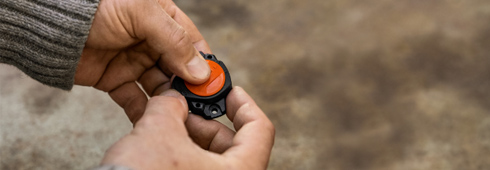
How do I connect the STIHL Smart Connector to my STIHL product?
Our installation videos demonstrate how to do this for all compatible STIHL products. They can be accessed via the STIHL connected App.
Can I use the STIHL Smart Connector with third-party products?
You can use the STIHL Smart Connector with third-party products, but functionality will be limited (for example, pre-populated operating-time-related maintenance information will not be available). See the STIHL connected instruction sheet and STIHL connected App for recommendations about mounting the Smart Connector on third-party products.
Can I reuse a second-hand STIHL Smart Connector on a different product?
STIHL Smart Connectors are designed to be mounted permanently, so use on another product is not recommended. However, the STIHL Smart Connector can always be reconfigured (in terms of the pairing between a tool and the STIHL Smart Connector).
How do I perform maintenance on my STIHL product when recommended to do so (e.g. checking the chain brake or chain lubrication, etc.)?
Take your STIHL product to your local dealer when prompted by the STIHL connected App. For all other maintenance, refer to your product’s instruction manual for step-by-step instructions. Tip: Digital instruction manuals are available at https://www.stihlusa.com also.
The location of my product is not shown or does not match the actual location. What can I do about this?
In order for location to be displayed correctly, both your smartphone with STIHL connected App and the relevant STIHL product must be in range at the place of use.
The operating time of my STIHL product is not recorded or is incorrect. What can I do about this?
In order to ensure that the operating time is recorded correctly, it’s important that the Smart Connector be attached to the STIHL product as outlined in the installation instructions. If the operating time is inaccurate despite following these recommendations, please ensure that there are no strong magnetic fields within a range of approximately 18 inches (0.5 m) during storage, transport or use.
Can the STIHL Smart Connector and the STIHL connect system also be used with second-hand products?
Yes, second-hand used products also can be used. The information in the STIHL connected App offers further guidance. And it’s possible to set the current hours on the tool when setting up products and the STIHL Smart Connector. This means the tool’s current hours can be entered in advance as a starting value.
Where can I find the serial number or barcode for my product?
The serial number and the barcode can be found on your STIHL product.
How can I change the language in the STIHL connected App or in the STIHL connect pro portal?
The language setting for the STIHL connect pro portal can be changed in the settings for your user account. You can change the language for the STIHL connected App under “Settings.”
How can I add a tool in the STIHL connected App or the STIHL connect pro portal?
After launching the STIHL connected App, you can find your product overview under “Equipment.” You can add new product using the “+” sign at the navigation bar on the bottom of the screen. In the STIHL connect pro portal, you can create new tools using the navigation bar in the tool overview.
How can I change the nickname of my product?
Nicknames can be assigned in the editing mode when setting up a new product or in subsequent editing. In the case of products already in the system, you can reach the setting in the respective detailed view of the product under “Edit.”
How can I delete a product?
You can do this in tool view under the “Edit” option.
How can I delete my STIHL connected account?
You can delete your personal account in account settings using the edit options in the STIHL connect pro portal. Please note that this will irrevocably delete all personal data and tool data stored in the STIHL connect system.
How can I authorize additional users?
As a fleet operator, you can create additional users or assign rights in the individual user settings at any time via the STIHL connect pro portal, allowing you to operate a community fleet of devices.
How can I change the product image?
When setting up a new product you can add a product picture from the photo gallery of your smartphone. Currently, changing pictures of already-added products is not available, although implementation of this functionality is planned. Workaround: Delete the product (product data will be lost) and add it again. Now you can take a new picture.
How can I change my address?
You can change the address of your user account using account setting in the STIHL connect pro portal. The address cannot be changed in the STIHL connected App.
How do I change my stored STIHL dealer?
You can change the information regarding your STIHL Dealer in the STIHL connect pro portal. The dealer cannot be changed in the STIHL connected App.
I cannot identify the serial number for the STIHL Smart Connector on the label. Can you help?
For paired products, the serial number and MAC address (unique code) can be viewed in the STIHL connect pro portal. In addition to the serial number in clear text, the 2D data matrix code includes the serial number. The data matrix code can be read using the STIHL connected App. If it’s no longer possible to read the entire label and the Smart Connector is no longer paired, it will not be possible to use the Smart Connector.
Where can I find personal support for setting up and using the STIHL Smart Connector?
You can call STIHL at 866-664-5225, email [email protected] or visit stihlusa.com/faq/products/connected.
Can I use my STIHL Smart Connector with tracking systems from other manufacturers or other fleet management systems?
Currently, it’s only possible to use the Smart Connector with the STIHL connected system.
How big is the range between a STIHL Smart Connector and a smartphone?
The range between a STIHL Smart Connector and a smartphone is generally up to 33 feet (10 meters). However, it may vary between different smartphones and if there are obstacles between the connector and the smartphone.
Can I assign multiple STIHL Smart Connectors to a single product?
No, only one STIHL Smart Connector can be assigned to each product.
Can multiple STIHL Smart Connectors be used at the same time?
Yes, it’s possible to use multiple STIHL Smart Connectors at the same time. However, this may result in individual connectors’ response times increasing.
How often is data synchronized between the STIHL connected App and the STIHL cloud?
When the STIHL Smart Connector recognizes that a tool is being operated, it sends the operating time to the STIHL connected App several times per minute. If there is an internet connection, the STIHL connected App also transfers the data to the cloud several times per minute. If there is no smartphone or internet connection, the data is temporarily stored until a connection is created and then transferred.
Does the STIHL connected system offer protection against theft?
Currently, the STIHL connected system cannot be used as protection against theft.
Is the operating time only determined if the STIHL connected App is connected?
The operating time is generally determined independently of a smartphone. However, the operating time is transferred to the STIHL connect pro portal several times per minute when the STIHL connected App is open. When the STIHL connected App is closed, the transfer interval reduces significantly.
What languages are available on the STIHL connected App?
The STIHL connected App is available in English and Spanish.
Which STIHL products have pre-populated maintenance recommendations?
Chainsaws
MSA 120, MSA 140, MS 170, MS 180, MS 201, MS 251, MS 261, MS 362, MS 500i
Pole pruners
HT 56, HT 103
Cut-off machines
TSA 230, TS 410, TS 420, TS 440, TS 500i
Brushcutters and clearing saws
FSA 45, FSA 130, FS 38, FS 40, FS 56, FS 91, FS 111, FS 131, FS 240, FS 311, FS 360, FS 460, FS 560
KombiSystem, MultiSystem, edger and earth augers
KMA 130, KM 56, MM 56, KM 91, KM 111, KM 131, BT 131, FB 131, FC 91, FC 96, FC 111
Blowers
BGA 85, BGA 100, BG 50, BG 56, BG 66, BG 86, BR 430, BR 500, BR 600, BR 700, BR 800
Home sprayers and mistblowers
SH 56, SH 86, SR 430, SR 450
Hedge trimmers
HSA 45, HSA 66, HS 82, HS 87
For other STIHL products, you’ll need to manually create your maintenance tasks.